|
 |
 |
|
|
|
||
|
Support Matrix
"Thank you for a fabulous piece of software! Clearly a lot of love has gone into the documentation, which is very much appreciated. I found it easy to troubleshoot and fix my small issues regarding dates and non-unique primary keys." "Moving data structures into FileMaker 7 from older versions or other database systems can be a real nightmare. But FmPro Migrator takes much of the pain out of it. ..." "FmPro Migrator from .com Solutions lets you use FileMaker Pro (FMP) as a rapid application development (RAD) tool to prototype enterprise-scale databases for MySQL, Oracle, Sybase, SQL Server, and IBM DB2. ..." FileMaker Solutions Advisor Zone FmPro Migrator saved me hours and hours of learning how-to
and migrating my databases. A very satisfied customer,
"With a corruption in the main file we were faced with rebuilding 40 tables, 306 TOs, 159 layouts and 463 scripts. FmPro Migrator to the rescue and a few hours later we have a new, not corrupt, file saving us at least a weeks work. FmPro Migrator has saved the day." "Just got done with my 20 file consolidation project.
It went really Darren Burgess
Additional Customers Include: UCLA
|
|
FmPro Migrator AI Accelerated Edition 11.84 - Introduces the Layout Conversion Workbench feature with support for .NET 9/10 XAML WPF + EF Core + C#/VB for Visual Studio 2026 - using cloud or local LLM models. FmPro Migrator Custom Development Edition and FmPro Migrator Site License Edition have been enhanced with support for using AI models running on your local computer using the Ollama software package. The use of locally running models is designed to support secure computing environments where the computer may be "air gapped" - unable to access the internet for security reasons. Top Features
Description
FmPro Migrator is a stand-alone application which quickly and accurately migrates FileMaker Pro data, schema, scripts, layouts and business logic to MySQL, Oracle, Access, SQL Server, Sybase, DB2, PostgreSQL, and SQLite. FileMaker Pro database structure and data are migrated to a database table in the destination database. Large text, repeating fields data and container field JPEG preview images are also migrated without manual data entry. The Table Consolidation feature performs the automated copying of
Tables/Fields, Table Occurrences, Relationships, scripts
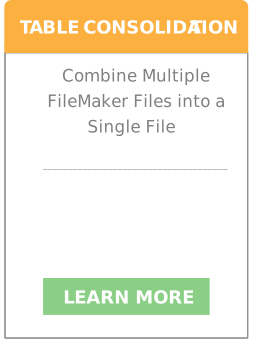
and Layouts between FileMaker 11 - 22 database files on macOS. Additional features included with FmPro Migrator Platinum Edition include the conversion of Visual FoxPro projects into LiveCode stacks, Microsoft Access database files, FileMaker Pro database files,Visual Studio 2010 .Net 4 projects. Most Visual FoxPro Form objects are supported, relationships are imported, and Visual FoxPro code is converted into commented code in the converted database project. Direct data transfers from .DBF files are supported for Access, DB2, FileMaker Pro, MySQL, Oracle, PostgreSQL, SQLite, SQL Server and Sybase database servers. FileMaker Table Consolidation Projects [FileMaker Merge Database Automation - Corrupt File Rebuild Automation]Support Note: The FileMaker 11 - 22 Table Consolidation feature is supported on macOS. Consolidating a multi-file solution into a single file improves FileMaker developer productivity because user accounts/privilege sets only need to be updated within a single file instead of dozens of files. Single-file solutions can also be easier to backup/move between computers and even send to users via an email attachment. FmPro Migrator Developer Edition implements automated batch capture and creation features using AppleScript (macOS) and clipboard XML for Tables/Fields, Table Occurrences, Relationships, Value Lists, Custom Functions, Layouts and Script Workspace Scripts using FileMaker Pro Advanced 11 - 22 on macOS. During the migration process, Table Occurrences and file references are automatically remapped into the new database structure without manual intervention on the part of the developer. TOs are remapped throughout every object of every Layout, Script and Relationship within the new migrated database file. The 2-pass dependency resolution feature makes 2 automated passes through the Layout creation process in order to resolve dependencies between scripts and layouts. During pass #1 of the layout creation process the layouts are created in the normal manner. FileMaker scripts are then pasted into the new database, thus resolving dependencies between scripts and layouts. Then during the 2nd pass through the layout creation process, the contents of each layout are deleted and pasted again, resolving dependencies between layout objects and scripts. The Layout text search and replace feature enables developers to quickly re-purpose Layouts between database solutions, by changing specified text strings within dozens of Layouts at once. This intelligent search mechanism is implemented to insure that text is changed only within Layout text objects, thus preventing the accidental replacement of text within TOs or field names. FmPro Migrator creates both custom and field based Value Lists using the clipboard XML transfer method. Custom Value List items and Custom Function code can also be edited within FmPro Migrator Developer Edition after being imported from the FileMaker DDR XML file. MySQL, Access, Firebird & SQL Server to FileMaker Pro The Access To FmPro Migration Service built into FmPro Migrator provides a fixed-price conversion feature for Microsoft Access database files to FileMaker Pro database files. This feature includes the conversion of Forms/Reports, Queries, Relationships, Value Lists, Layouts and Visual Basic code. Using FmPro Migrator, Access databases can be migrated to FileMaker 11+ in order to take advantage of FileMaker Pro's legendary ease of use and increased data management capacity. Migrated Access databases can now grow to the maximum 8TB file size offered by FileMaker 11+ and can be run on macOS and Windows. FmPro Migrator makes a direct ODBC connection to MySQL and SQL Server databases to automate the mapping of SQL Server columns to FileMaker Pro fields, perform column name to field name conversions and create the tables in the FileMaker database. When using FileMaker Pro 17+, FmPro Migrator can put the table definition XML code onto the clipboard for easy pasting directly into FileMaker Advanced. On macOS, FmPro Migrator utilizes the Actual ODBC Driver for SQL Server from Actual Technologies to make a direct connection to SQL Server and Access databases (purchased separately). FmPro Migrator makes a direct ODBC connection to Firebird databases to automate the gathering of table structure, relationships and transferring data to FileMaker Pro. Firebird relationships are converted into FileMaker Pro relationships and rebuilt in an automated manner using AppleScript on macOS. FileMaker Pro to SQL Databases
FmPro Migrator documents and migrates FileMaker Pro database structure and data to MySQL, Oracle, Access, SQL Server, Sybase, DB2, PostgreSQL, and SQLite. FmPro Migrator interactively reads meta-data from FileMaker Pro databases, gets Field size info for each field, creates the table in the SQL database and transfers data (including images and repeating fields) between the databases. Using the FileMaker Pro/FileMaker Server External SQL Sources feature, data can be stored within a MySQL, Oracle or SQL Server database but still be used within FileMaker Pro as if the data was stored locally. Thus achieving the reuse of existing FileMaker Pro layouts and business logic. FmPro Migrator facilitates ESS configurations by performing the initial SQL table creation and data transfer to the SQL database server. Critical tasks performed by FmPro Migrator include the automated sizing of SQL table columns based upon FileMaker Pro field contents and the transfer of repeating fields data into a new relational table structure. Repeating Fields Migration FmPro Migrator also migrates repeating fields within FileMaker 11+ databases using auto-generated data transformation scripts. This feature overcomes the lack of repeating fields support within new versions of the FileMaker Pro ODBC driver.
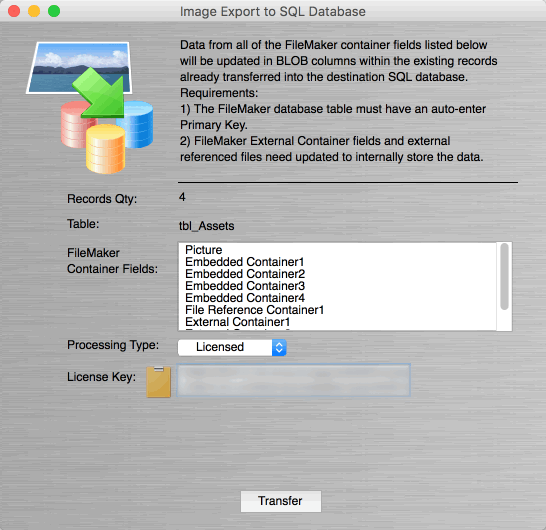
FmPro Migrator Platinum Edition directly transfers images and attached files via ODBC to facilitate the migration of FileMaker Pro container field binary data into SQL databases. This container field transfer feature supports inserting of embedded [not external] container field data directly into BLOB columns of SQL databases including MySQL, SQL Server, PostgreSQL, Oracle, and SQLite. Currently shipping FileMaker Pro versions support the insertion of images including GIF, JPEG, TIFF, PDF, EPS, and PNG when using the Insert Picture... menu. Inserting binary files of all types is supported when selecting the FileMaker Insert File... menu which would commonly be used for storing spreadsheets and other binary files. Earlier FileMaker versions supported additional file types which are no longer directly supported (including: EMF+ -Windows Enhanced MetaFile Plus, META - Windows Metafile (enhanced), METO - Windows Metafile (original), XMLO - FileMaker layout, JP2 - JPEG 2000, moov - (old) QuickTime format, PICT, qtif - QuickTime Image File, MacPaint, FPix - FlashPix, .SGI, TPIC - TGA - Targa, .SGI generic bitmap, 8BPS Photoshop). These deprecated file types can also be exported to disk by FmPro Migrator, using an alternate image export feature for older FileMaker 7 - 13 versions.
Convert Layouts, Scripts, Relationships, Value Lists to Functional LiveCode Desktop and Mobile Applications The LiveCode Conversion feature built into FmPro Migrator Platinum Edition provides an automated FileMaker Pro to LiveCode cross-platform desktop/mobile applications conversion feature. This feature includes the conversion of layouts/forms/reports, scripts, relationships, tab controls and value lists. Features of the FileMaker database are logically grouped with easily updated libraries [SQL_Library, Value_List_Library, Relationships_Library] within the new stack file architecture. Convert Layouts to Functional PHP Web Applications The PHP Conversion feature built into FmPro Migrator Platinum Edition provides an automated FileMaker Pro to PHP web applications conversion feature. This feature includes the conversion of layouts/forms/reports, scripts, relationships, tab controls and value lists. This feature leverages the automated layout and relationship importing features of FmPro Migrator Platinum Edition. FileMaker Pro developers can convert existing or new FileMaker Pro database files directly into functional PHP web applications within a few minutes. The converted PHP web application uses the contents of existing layouts to build dynamic web forms having insert, query, update and delete features. Almost all layout objects are converted, including: charts, image fields, tab controls, custom value list menus, field-based value list menus (single and dual field), checkboxes, radio buttons and vector graphic objects (rectangle, rounded rectangle, oval/circle). Convert FileMaker Pro to SQLite Convert FileMaker Pro database files into SQLite, in preparation for performing an automated conversion into LiveCode for building desktop or mobile applications. SQLite is the portable database of choice for mobile application development, if data needs to be stored on a mobile device. Automated Batch Transfer (Mirroring, Data Sync) [Platinum Edition Feature]
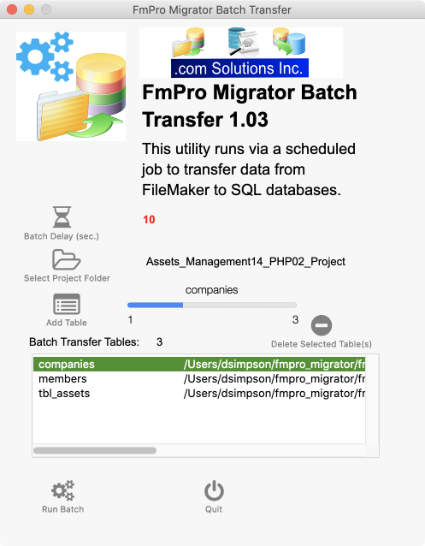
The FmPro Migrator Batch Transfer utility is included with FmPro Migrator Platinum Edition licenses. This new utility enables automated data transfers (data sync, mirroring of data) from FileMaker Server Server to SQL databases (MySQL, SQL Server, PostgreSQL, Oracle, SQLite). What it is:
What it is not:
|
|
|
|
|
|
|||||||||||||||||||||||||||||||
|
|
|||||||||||||||||||||||||||||||||||||||
|
|
|||||||||||||||||||||||||||||||||||||||
|
||
|
|
|
|
||





 FileMaker Data Migration Tool using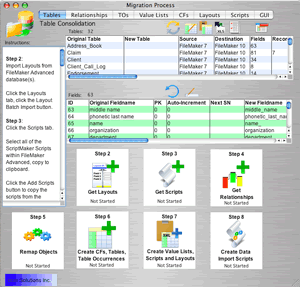

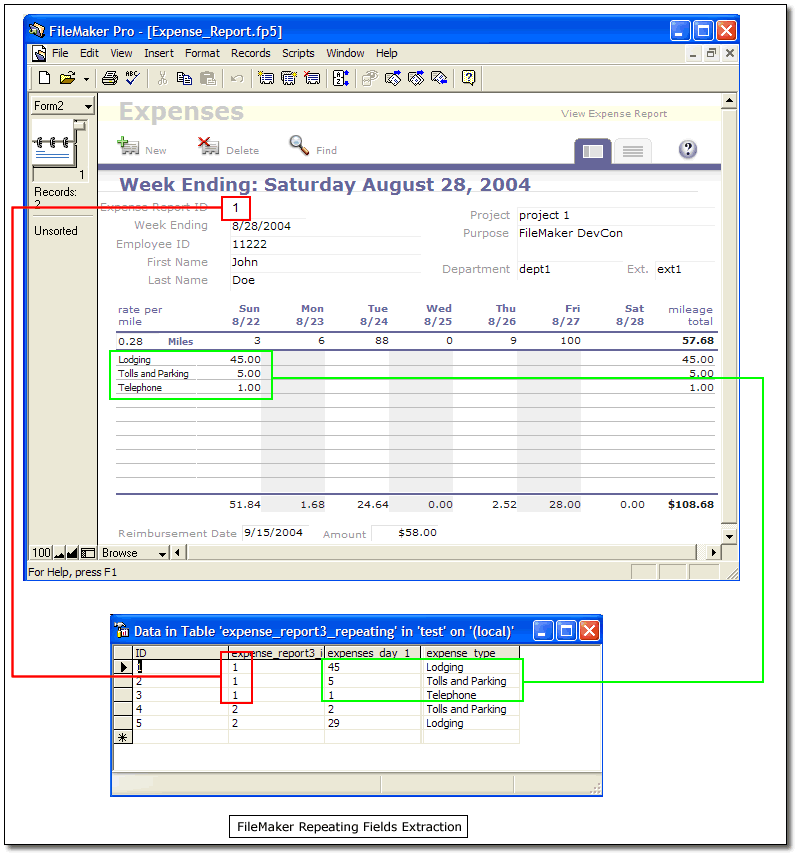
 Image Transfer to SQL Databases